
AndroidiOS coming soon
Tether Link UtilityYour phone's mobile data, on every device.
Tether Link Utility runs a local SOCKS5 proxy on your Android phone and shares it over Wi-Fi hotspot, so your laptop, tablet or another phone can use your mobile data. Everything runs on your device.
GET IT ONGoogle Play
COMING SOONApp Store
- Free to install
- No root
- No account
- No remote server
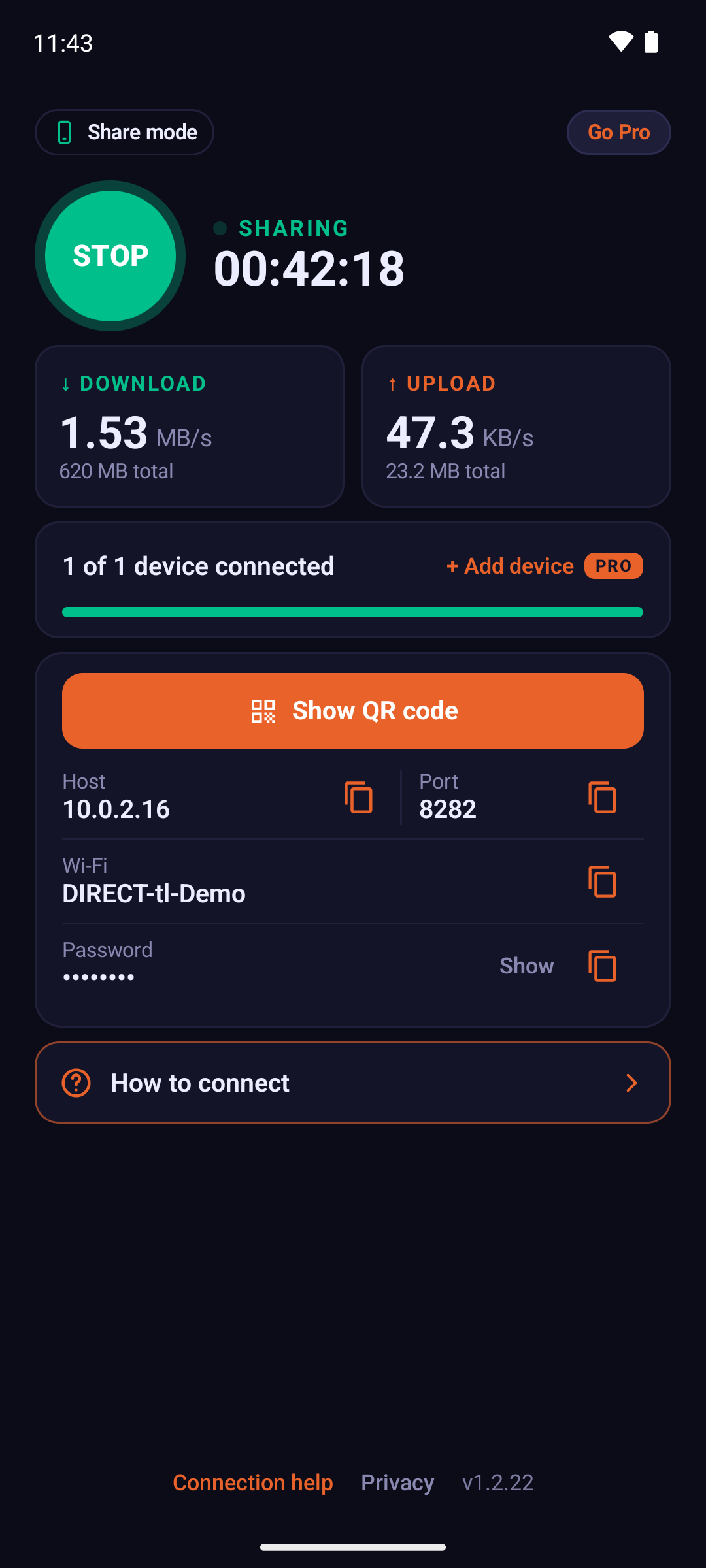
Connected in four steps
Watch the demo ▸Before you start
You need at least two devices: one phone shares its mobile data, your other devices connect to it.
Shares
This phone
Turn on mobile data. Open the app in Share mode, tap START SHARING and tap the device you want to connect.
Connects
Your other devices
Android phone: no app yet? The sharing phone shows how to install it, even without internet. Then tap Use another phone's internet and Scan QR code.
Windows PC or Mac: while it still has internet, download the Windows setup file or the Mac script. It installs and runs sing-box for you, so every app uses the phone's internet. Then join the Wi-Fi shown on the sharing phone and type the two values. ▶︎ Watch the Windows video (1:21) ▶︎ Watch the Mac video (1:19)
iPhone or Linux: install Potatso (iPhone) or Firefox (Linux) first, then join the Wi-Fi shown and enter the two values.
Stuck? Tap Still not connected? in the app and pick what you see.
-
01
Tap START SHARING
The hotspot turns on automatically and the proxy starts.
-
02
Pick the other device
The app asks if it has the app first, before any Wi-Fi.
-
03
Connect your device
Android scans the QR code. Computers and iPhones join the Wi-Fi and enter the two values.
-
04
Start browsing
Traffic routes through your mobile data. Nothing goes through our servers.
Fully local
The proxy runs on your phone. No account and no remote server: your routed traffic is never sent to our servers or logged by the proxy. The free version shows ads, and our ad provider may collect device identifiers. See the Privacy Policy.
Android-to-Android auto connect
Scan the QR code on the other Android phone; on most devices Wi-Fi joins and the proxy connects automatically.
IP change alerts
Carrier IPs can change between sessions. The app notices the change and alerts connected devices automatically.
Using your phone's own hotspot? If you turn on Mobile Hotspot (Android) or Personal Hotspot (iPhone) yourself, save its name and password once with Add hotspot Wi-Fi details in the app. They stay on your device, the hotspot itself isn't changed, and they're added to the QR code so other devices join by scanning. Not needed when the Android app starts its own hotspot. Data used by connected devices counts toward your mobile plan. Check your carrier's terms for tethering.
See it in action
Stuck connecting a computer? Pick yours and follow along, step by step.


Platforms
Works with what you already have
Windows PCs and Macs: one file installs and runs sing-box for you, so every app on the computer uses the phone's internet, DNS included. iPhones connect with the free Potatso app.
Full setup guide →- every app
Windows
Recommended: the setup file. Double-click it, type the two values and every app works. ▶︎ Watch the Windows video (1:21)
- every app
macOS
Recommended: the Mac script. Run it in Terminal, type the two values and every app works. ▶︎ Watch the Mac video (1:19)
- built-in
Android
Scan the QR code in Tether Link Utility. No extra app needed.
- SOCKS5
iOS
Potatso (free) or Shadowrocket (paid), for that app's own traffic only.
Pricing
Free to start. Pro when you need more.
Free
$0
- 1 device at a time
- Banner and interstitial ads
- No account needed
Pro
from$3.99/month
- 5 devices at once
- No ads
- No account needed
Exact price, including local currency and yearly plan, is shown in Google Play.
Hotspot guides
How hotspot limits work on your carrier, and how to check yours.
Frequently asked questions
How does Tether Link Utility work?
It runs a local SOCKS5 proxy on your Android phone, using Android's VpnService API, and shares it over the phone's Wi-Fi hotspot (no USB cable involved). Your other devices send their traffic to that proxy, and the phone forwards it over its mobile data connection. There's no remote server in between.
Do I need root access?
No, it works entirely without root privileges.
Does it use a remote server?
No. Proxied traffic goes from your devices to your phone and out over your mobile data; it is not routed through, logged, or stored on any server of ours. The free version shows Google AdMob ads, and the app uses Firebase Analytics and Crashlytics, which collect device identifiers and usage and crash data, as described in our privacy policy.
Can I connect a Windows or Mac laptop?
Yes. On Windows, download the setup file; on a Mac, the script. Each one installs and runs sing-box for you, so every app on the computer, DNS included, uses the phone's internet. Then type the IP and port shown in the app. Options that cover fewer apps (Firefox, FoxyProxy, the Mac's proxy setting) also exist. Written steps. ▶︎ Watch the Windows video (1:21) ▶︎ Watch the Mac video (1:19)
Does a SOCKS5 proxy setting protect all my traffic?
Not entirely. A browser or system SOCKS5 setting only reroutes traffic from apps that check it; DNS lookups and other background traffic can still go over the plain hotspot connection. For full coverage, use the Windows setup file or the Mac script: they run sing-box in TUN mode and send the whole computer's traffic, DNS included, through the phone. ▶︎ Watch the Windows video (1:21) ▶︎ Watch the Mac video (1:19)
Does it work with iPhone?
iOS has no native SOCKS5 setting, but apps like Potatso or Shadowrocket can connect to the proxy the same way, for that app's own traffic only, not the whole device. A verified full-device option isn't currently available on iOS. A native iOS app is in development and coming soon.
How many devices can connect at once?
The free tier connects 1 device at a time; Pro raises that to 5. Pro starts from $3.99/month. The exact price, including local currency and yearly plan, is shown in Google Play.
Does it work with 5G and 4G/LTE?
Yes, it shares whatever active mobile data connection your phone currently has, regardless of network generation.
Does it use my mobile data plan?
Yes. Data used by connected devices counts toward your plan. Check your carrier's terms for tethering.
Is it free?
Yes, the free version is free to use: 1 device at a time, with ads. Pro removes ads and allows up to 5 devices at once. The app itself doesn't currently add a speed limit; actual speed depends on your carrier, plan and signal.
Can other devices join my own hotspot by scanning the QR code?
Yes. If you turn on your phone's system hotspot yourself (Mobile Hotspot on Android, Personal Hotspot on iPhone), save its network name and password once with Add hotspot Wi-Fi details in the app. They are stored only on your device, the app doesn't change your hotspot settings, and the details are added to the QR code so other devices join the network automatically by scanning. On iPhone, the password is shown in Settings > Personal Hotspot. When the Android app starts its own hotspot automatically, this step isn't needed.
The other device can't see the Wi-Fi network. What can I do?
On another Android phone you don't need the Wi-Fi list: open Tether Link Utility there, tap Use another phone's internet, then Scan QR code, and point the camera at the code on the sharing phone. It joins the Wi-Fi by itself. On an iPhone or a computer, keep the sharing phone's screen on and close by, then refresh the Wi-Fi list, or add the network by hand with the name and password shown in the app. Still not there? That device can't see this kind of Wi-Fi. On the sharing phone, tap STOP, turn on the phone's own hotspot in its settings, then tap Add hotspot Wi-Fi details in the app, type that hotspot's name and password and start sharing again.
Install free on Google Play
Share your phone's mobile data in one tap
